Infrastructure as Code Has a New Playbook: formae and Pkl


I have always been a big fan of “<Insert artifact here> as Code” implementations for several reasons. The artifacts are co-located with the code so you don’t have to go hunting for them you need information. They also enjoy the same rigor like versioning and testing as production code. There are many great examples. Architecture as Code. Diagrams as Code. Documentation as Code. And of course the ubiquitous Infrastructure as Code (IaC).
IaC is powerful because it allows you to automate the provisioning and management of your infrastructure through configuration files. Versioning across deploys and repeatability across environments are particularly useful, and the confidence to tear down and recreate entire environments on demand was a game change when IaC arrived on the scene. There are many popular IaC tools out there:
- Terraform by HashiCorp, which uses a declarative language called HCL to manage multi-cloud resources
- OpenTofu, the open source fork of Terraform
- AWS CloudFormation, Amazon’s native IaC service for provisioning AWS resources via JSON or YAML templates
- Ansible by Red Hat, an agentless automation tool for configuration management and orchestration
- Pulumi, which lets you define infrastructure using general-purpose programming languages like TypeScript, Python, and Go
While all of these represent significant advancements over the status quo before IaC, there were several significant problems.
Configuration drift is the slow, silent disaster of infrastructure management. Someone updates an S3 bucket policy in the console. A teammate tweaks an
ECS task definition directly. Nobody writes it down. Six months later your code says one thing and production says something completely different, and you
spend two days figuring out why your deployment broke. The root cause is almost always the same: configuration files have no types. YAML, JSON, and TOML are all happy to accept
maxConnections: "fifty" right alongside maxConnections: 50. There are just magic strings. As someone obsessed with type safety,
I find this especially problematic.
While Pulumi solves this particular problem by replacing endless walls of configuration text with Turing complete, probably typed programming languages, this makes configuration more complex, less deterministic, and more error-prone because you have introduced the possibility of bugs and side effects just like your production code. In other words, this approach overcompensates too far in the opposite direction.
All of this means there is room a for a happy medium that can offer the best of both worlds.
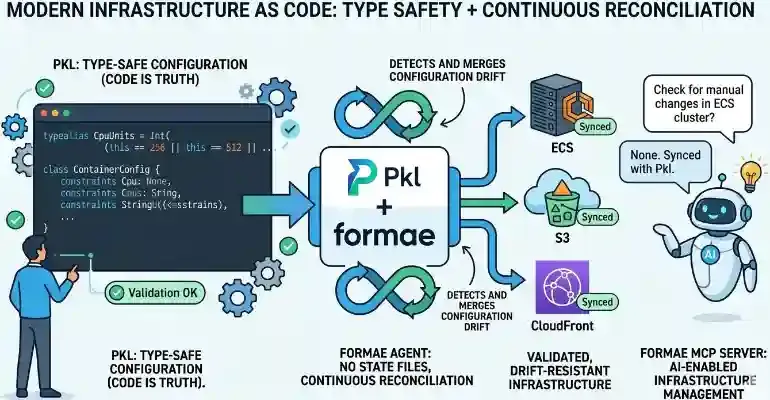
Two tools have combined to reshape what IaC can actually look like. One is Pkl, Apple’s open source, type safe configuration (but not programming) language. You can use it anywhere you need configuration, from Spring Boot to Kubernetes. The other is formae (yes, spelled in lowercasse like poet ee cummings or musician k.d. lang), a new IaC tool that uses Pkl for configuration files that represent the source of truth for your infrastructure. Together they plug the leaks that have made traditional IaC so frustrating.
formae also goes one step further with an MCP server that lets AI agents reason about and act on your infrastructure directly. Let’s dig in.
Pkl: Configuration Errors Are Now Compile-Time Errors
For such a simple language, Pkl is really quite powerful. It offers typed properties, constraints, union types,
default values, inheritance through amends, and computed properties. When your config violates a constraint, you get an error at evaluation time, before
anything gets deployed. It’s the “make impossible states impossible” principle I love so much applied to infrastructure.
Here’s what that looks like in practice. Imagine you’re defining the configuration for your ECS task definition shared across environments:
// infra/base/EcsTaskConfig.pkl
module EcsTaskConfig

typealias CpuUnits  = Int(this == 256 || this == 512 || this == 1024 || this == 2048 || this == 4096)
typealias MemoryMiB = Int(this >= 512 && this <= 30720)

// Only allow known, safe log levels — no "YOLO" in production
typealias LogLevel = "DEBUG" | "INFO" | "WARN" | "ERROR"

class ContainerConfig {
  image: String(startsWith("123456789012.dkr.ecr.us-east-1.amazonaws.com/"))
  cpu: CpuUnits = 512
  memory: MemoryMiB = 1024
  logLevel: LogLevel = "INFO"
  portMappings: Listing<UInt16>
}

class EcsTaskConfig {
  family: String
  containers: Listing<ContainerConfig>(length >= 1)
  executionRoleArn: String(startsWith("arn:aws:iam::"))
  taskRoleArn: String(startsWith("arn:aws:iam::"))
}
This is like defining classes in Object-Oriented Programming.
Then your production config amends this base and fills in the specifics. Think of it like instantiating the classes
you defined.
// infra/production/ecs-webapp.pkl
amends "package://pkg.pkl-lang.org/github.com/platform-engineering-labs/formae/formae@0.15.0#/Resource.pkl"

import "../base/EcsTaskConfig.pkl"

family = "webapp-production"
executionRoleArn = "arn:aws:iam::123456789012:role/ecsTaskExecutionRole"
taskRoleArn      = "arn:aws:iam::123456789012:role/webappTaskRole"

containers {
  new EcsTaskConfig.ContainerConfig {
    image        = "123456789012.dkr.ecr.us-east-1.amazonaws.com/webapp:latest"
    cpu          = 1024
    memory       = 2048
    logLevel     = "INFO"
    portMappings { 8080 }
  }
}
Try setting cpu = 999 or logLevel = "TRACE" or an image URI that doesn’t match your ECR registry. Pkl tells you immediately.
You’ve moved configuration errors from “3 AM production incident” to “the moment you save the file.” That’s the kind of
feedback loop shift that DORA research has confirmed makes teams more productive.
Take a look at the typealias called CpuUnits. AWS ECS only accepts specific CPU values. The Pkl defintinion above encodes that business rule directly in the
type as a union of type of a finite set of integer values. You can’t accidentally set cpu = 300. The type system prevents it.
This is what statically typed configuration means in practice, and it’s why I’m a big fan of Pkl.
formae: IaC That Treats Code as Truth
Terraform and OpenTofu are the most popular IaC tools. They manage state files that track what’s deployed but they can become a liability at scale.
They need to be stored somewhere, typically somewhere remote, with their own locking mechanism. The big problem is that it is common for
someone to alter the infrastructure manually in the console because they do not recognize state files as the source of truth. With the state
files now misaligned with the real infrastructure, this is textbook configuration drift. Terraform won’t know it until you make the effort
to run terraform plan periodically as a chrom job or in CI/CD on a schedule or on an event basis (like a pull request). Running terraform apply
to make changes will also detect drift. Still, in both cases, it’s on you to figure it out.
formae has no state files. Your Pkl configuration is the source of truth. formae’s agent (not an AI agent but rather a long-running daemon with its own HTTP server, datastore connection, and retry logic) continuously reconciles reality against your code. If something drifts outside your IaC definitions, like a manual change in the AWS console or an automated key rotation, formae detects it and can merge or reject the change depending on your configuration. This is pretty cool.
Consider a simple web application deployed to AWS. Let’s see what it looks like to manage an S3 bucket for static assets alongside an ECS-hosted web application behind CloudFront. First, configure your AWS target using formae’s Pkl types:
// infra/formae-config.pkl
amends "package://pkg.pkl-lang.org/github.com/platform-engineering-labs/formae/formae@0.15.0#/Config.pkl"

local awsTarget = new Target {
  label       = "aws-production-us-east-1"
  namespace   = "AWS"
  discoverable = true
  config {
    type    = "aws"
    region  = "us-east-1"
    profile = "production"
  }
}

targets { awsTarget }
Then define your stack on AWS:
- S3 bucket for assets
- ECS for the app
- CloudFront as the CDN for both
// infra/production/webapp-stack.pkl
amends "package://pkg.pkl-lang.org/github.com/platform-engineering-labs/formae/formae@0.15.0#/Stack.pkl"

// --- S3: Static Asset Bucket ---
local assetBucket = new Resource {
  label  = "webapp-assets"
  type   = "AWS::S3::Bucket"
  target = "aws-production-us-east-1"
  stack  = "webapp-production"
  properties {
    BucketName          = "my-webapp-assets-prod"
    VersioningConfiguration { Status = "Enabled" }
    PublicAccessBlockConfiguration {
      BlockPublicAcls       = true
      BlockPublicPolicy     = true
      IgnorePublicAcls      = true
      RestrictPublicBuckets = true
    }
    Tags { ["Environment"] = "production"; ["ManagedBy"] = "formae" }
  }
}

// --- ECS Cluster ---
local ecsCluster = new Resource {
  label  = "webapp-cluster"
  type   = "AWS::ECS::Cluster"
  target = "aws-production-us-east-1"
  stack  = "webapp-production"
  properties {
    ClusterName = "webapp-production"
    Tags { ["Environment"] = "production" }
  }
}

// --- ECS Service ---
local ecsService = new Resource {
  label  = "webapp-service"
  type   = "AWS::ECS::Service"
  target = "aws-production-us-east-1"
  stack  = "webapp-production"
  properties {
    ServiceName    = "webapp-production-service"
    Cluster        = ecsCluster.properties["ClusterName"]
    TaskDefinition = "webapp-production:latest"
    DesiredCount   = 2
    LaunchType     = "FARGATE"
    NetworkConfiguration {
      AwsvpcConfiguration {
        AssignPublicIp = "DISABLED"
        Subnets        { "subnet-abc123"; "subnet-def456" }
        SecurityGroups { "sg-webapp-prod" }
      }
    }
    Tags { ["Environment"] = "production"; ["ManagedBy"] = "formae" }
  }
}

// --- CloudFront Distribution ---
local cdn = new Resource {
  label  = "webapp-cdn"
  type   = "AWS::CloudFront::Distribution"
  target = "aws-production-us-east-1"
  stack  = "webapp-production"
  properties {
    DistributionConfig {
      Enabled         = true
      PriceClass      = "PriceClass_100"
      HttpVersion     = "http2and3"
      Origins {
        // S3 origin for static assets
        new {
          Id                    = "S3-webapp-assets"
          DomainName            = "\(assetBucket.properties["BucketName"]).s3.us-east-1.amazonaws.com"
          S3OriginConfig { OriginAccessIdentity = "origin-access-identity/cloudfront/ABCDEFG" }
        }
        // ECS / ALB origin for the app
        new {
          Id         = "ALB-webapp"
          DomainName = "webapp-prod-alb-1234567890.us-east-1.elb.amazonaws.com"
          CustomOriginConfig {
            HTTPSPort            = 443
            OriginProtocolPolicy = "https-only"
          }
        }
      }
      DefaultCacheBehavior {
        TargetOriginId       = "ALB-webapp"
        ViewerProtocolPolicy = "redirect-to-https"
        CachePolicyId        = "658327ea-f89d-4fab-a63d-7e88639e58f6" // CachingOptimized
      }
      CacheBehaviors {
        new {
          PathPattern          = "/assets/*"
          TargetOriginId       = "S3-webapp-assets"
          ViewerProtocolPolicy = "redirect-to-https"
          CachePolicyId        = "658327ea-f89d-4fab-a63d-7e88639e58f6"
        }
      }
    }
  }
}

resources { assetBucket; ecsCluster; ecsService; cdn }
Now apply your configuration in the command line (probably in your CI/CD pipeline).
formae apply infra/production/webapp-stack.pkl --target aws-production-us-east-1formae’s agent picks up your configuration, resolves the dependencies in the right order (S3 before CloudFront, cluster before service), and drives the changes
asynchronously. If you like, you can even simulate your changes first with --simulate before you make things official.
Most importantly, the formae agent checks periodically for drift. If someone manually changed your S3 bucket policy or scaled the ECS service through the console, formae validates that the change conforms to the rules you defined through your type safe Pkl configuration. If it does, it incorporates the changes. If it doesn’t, formae tells you.
If formae existed a few years ago, I would have thought its automated drift detection and validation was its coolest feature. But in the age of AI, there is something else formae can do that is probably cooler.
The formae MCP Server: Your AI Agent Can Now Manage Infrastructure
formae ships with an MCP server, so you can use any MCP client like Goose, Claude Desktop, or any modern IDE to query and, if your organizational policy allows, update your infrastructure directly using natural language. That is pretty cool.
When you run the formae agent and expose its MCP server, you can configure your MCP client to do things like this:
- Query your inventory — Ask “What S3 buckets are in the production stack?” and get back the right answer in real time.
- Check drift — Ask “Has anything changed in the webapp-production stack since the last check?” if you want to check for configurtion drift manually.
- Simulate changes — Ask “What would change if I applied this config?” before any real action is taken.
- Apply infrastructure — Let an agent propose and apply a formae config with human-in-the-loop approval.
This is already awesome, but imagine the possibilities. For example, AI agents could connect to formae MCP as part of a swarm that is also connected GitHub, Jira, and your entire engineering infrastructure for autonomous action. Of course you need a mature AI governance and guardrail strategy to make that work, but that is a story for another day. The main point here is formae MCP opens up a lot of options.
This is the right model for AI + infrastructure. A live, type-validated, code-first source of truth with an MCP interface that AI agents can actually trust and act on.
Why The Pkl-formae Combination Works
Pkl and formae reinforce each other in a way that’s more than the sum of their parts.
Pkl gives you the type system. Types enforce your infrastructure. Constraints enforce your
business rules. The amends feature enable reuse so staging and production share a common base without copy-paste drift.
formae gives you the runtime guarantee. It uses Pkl to validate your configuration. It validates and detects drift for you. It manages dependencies among resources. Its MCP server enables AI to understand your infrastructure—not as a novelty but as a genuine operational, natural language interface. Your AI assistant knowing in real time how many ECS services are running, whether any resources have drifted, and what a proposed change would actually do to your infrastructure is powerful. That’s AI at its best in an organization.
The old playbook of raw YAML, state files in S3 with DynamoDB locking, CI/CD running terraform plan on a schedule, and crossing your fingers got us pretty far, but configuration drift, fragile state,
and zero feedback at definition time have always been cracks in the foundation. Pkl seals them at the config layer. formae seals them at the
infrastructure layer. Together, they represent Infrastructure as Code at its modern best.